
5 Benefits of Google Tag Manager (GTM) for Marketers
- Brady Hancock

- Mar 1, 2025
- 6 min read
Updated: Dec 13, 2025

Google Tag Manager (GTM) is one of the most powerful tools in a modern market
ing stack. While many teams still rely on hard-coded tracking or scattered scripts, GTM offers a cleaner, flexible way to manage analytics and marketing tags across your website.
When implemented correctly, Google Tag Manager helps marketers move faster, reduce tracking errors, and gain better insight into how users interact with their site. In this article, we’ll break down five key benefits of Google Tag Manager, explain how it works, and show why GTM has become a foundational tool for successful digital marketing.
What Is Google Tag Manager?

Google Tag Manager is a tag management system that allows you to deploy and manage tracking scripts—known as tags—without repeatedly editing your website’s source code.
Instead of adding individual tracking snippets for Google Analytics, Google Ads, Meta, or other platforms directly to your site, you install a single GTM container. From there, you control when and how tags fire using rules inside the GTM interface.
This centralized approach gives marketers more control over tracking while reducing dependence on ongoing developer updates.
How Google Tag Manager Works
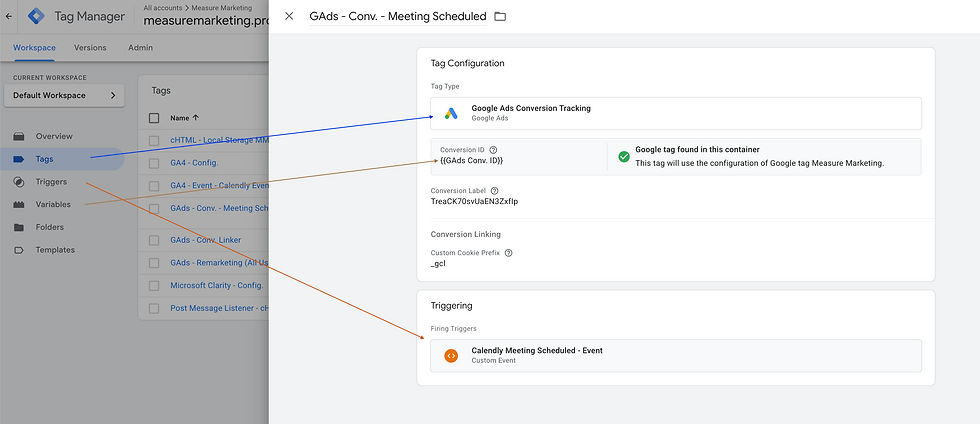
Google Tag Manager is built around three core components:
Tags: The tracking scripts you want to run, such as GA4 event tags, Google Ads conversion tags, or third-party marketing pixels.
Triggers: The rules that determine when a tag fires. Triggers can be based on page views, clicks, form submissions, scroll depth, or custom events.
Variables: The values that provide additional information to tags, like page URL, click text, product ID, or transaction value.
Many advanced GTM implementations also use a data layer—a structured JavaScript object that passes clean, consistent data from the website into GTM. A well-implemented data layer allows for more reliable GA4 event tracking and richer reporting.
1. Simplified Tag Management
One of the biggest benefits of Google Tag Manager is how it simplifies tag management across your site.
Instead of juggling scripts in multiple locations, GTM allows you to manage all tracking tags in one place. This makes it easier to add, update, or remove tracking without introducing unnecessary complexity into your site’s codebase.
In practice, this means you can deploy a new GA4 event, update a conversion tag, or add a remarketing pixel in minutes rather than waiting for a full development release. As your tracking needs evolve, GTM helps keep everything organized and easier to maintain.

2. Increased Flexibility and Agility
Marketing strategies change quickly, and tracking needs often change with them. Google Tag Manager allows teams to adapt without slowing down execution.
With GTM, you can:
Adjust triggers for specific URLs or page types
Add event tracking for new buttons or forms
Modify GA4 event parameters without redeploying site code
GTM also includes Preview mode and version control, which lets you test changes before publishing and roll back to a previous version if needed. This flexibility makes GTM especially valuable for teams running frequent campaigns, landing page tests, or funnel experiments.

3. Enhanced Tracking and Deeper Insights
Google Tag Manager enables more advanced tracking than basic pageviews alone.
For GA4, GTM makes it easier to implement event-based measurement, such as:
Form submissions and lead generation events
Click tracking on calls-to-action
Ecommerce events like add to cart, checkout, and purchase
Scroll depth and engagement tracking
When paired with a structured data layer, GTM can pass detailed parameters into GA4—such as product details, revenue values, and user interactions—resulting in more meaningful reports, better attribution, and stronger audience building.
4. Reduced Risk of Tracking Errors
Tracking errors are more common than most teams realize. Duplicate tags, missing events, and broken scripts can silently distort reporting and lead to poor decision-making.
Google Tag Manager helps reduce these risks by providing:
A built-in debug and preview environment
Version history with clear change logs
Centralized control over all tracking scripts
By testing changes before publishing and maintaining visibility into what was modified and when, GTM helps protect the integrity of your analytics and conversion data.
5. Better Collaboration and Governance
As teams grow—or as multiple vendors touch a website—tracking can quickly become messy. Google Tag Manager includes features designed for collaboration and governance.
Workspaces allow multiple users to build changes in parallel, while user permissions help control who can publish updates. Version notes provide transparency into why changes were made, reducing confusion over time.
These features make GTM easier to manage long-term and prevent the common “mystery tag” problem where no one knows why a script exists or what it does.

Google Tag Manager Permissions: Account vs. Container Access
As teams grow and more people touch tracking, Google Tag Manager permissions become critical for protecting data quality. GTM uses a two-level permission system—account access and container access—to control who can view, edit, and publish changes.
Understanding how these permission levels work helps prevent accidental publishes, duplicate tags, and untracked changes.
GTM Account-Level Permissions
Account-level permissions control access to the entire Google Tag Manager account, which may contain multiple containers across different websites or apps.
Common account-level roles include:
Administrator – Full access to manage users, create containers, and assign permissions.
User – Can access containers within the account based on container-level permissions.
Account permissions are typically reserved for internal stakeholders or trusted partners who need visibility across all GTM containers.
GTM Container-Level Permissions
Container-level permissions determine what a user can do within a specific container. This is where most day-to-day governance happens.
Common container permission levels include:
Read – View tags, triggers, and variables without making changes.
Edit – Create and modify tags, triggers, and variables, but cannot publish.
Approve – Review and approve changes before publishing.
Publish – Publish versions live to the site.
Separating edit and publish permissions allows teams to collaborate safely while maintaining control over what goes live.
Why GTM Permissions Matter
Without proper permission management, GTM containers can quickly become chaotic. Too many users with publish access increases the risk of:
Accidental tag changes
Duplicate or conflicting tracking
Unclear ownership of updates
Difficulty auditing past changes
Using account and container permissions intentionally creates a clear workflow, supports accountability, and helps maintain reliable analytics data over time.
Best Practices for Managing GTM Permissions
To keep your GTM setup clean and secure:
Limit publish access to a small number of trusted users
Use edit-only access for collaborators and vendors
Assign read-only access for stakeholders who just need visibility
Regularly review user permissions, especially after projects end
Require version notes for all published changes
Well-managed permissions are a key part of maintaining a scalable and trustworthy Google Tag Manager implementation.
Bonus: Google Tag Manager and Server-Side Tagging
As tracking requirements evolve, many teams are moving beyond traditional browser-based tagging toward server-side tagging using Google Tag Manager.
Server-side tagging shifts part of your tracking setup from the user’s browser to a secure server environment. Instead of sending data directly from the browser to platforms like GA4 or ad networks, events are first sent to a server-side GTM container, where they can be validated, transformed, and forwarded.If you would like to learn more about server-side tagging, check out this blog.
Google Tag Manager Best Practices
To get the most out of GTM, it’s important to follow a few best practices:
Use clear, consistent naming conventions for tags, triggers, and variables
Always test changes in Preview mode before publishing
Document updates using version notes
Avoid duplicate tracking across hard-coded scripts and GTM
Use a data layer for key events whenever possible
Limit publish permissions to maintain control
Following these practices helps keep your GTM container clean and ensures your data remains trustworthy.
Google Tag Manager FAQ
Do I need Google Tag Manager if I use GA4?
Not strictly, but GTM is one of the most common and flexible ways to implement GA4 event tracking without hard-coding updates.
Is Google Tag Manager free?
Yes. GTM is free to use for most businesses.
Will Google Tag Manager slow down my website?
A well-configured GTM container typically has minimal performance impact. Issues usually come from unnecessary or poorly configured tags.
What’s the difference between Google Tag Manager and Google Analytics?
Google Analytics (GA4) is used to analyze data. Google Tag Manager helps deploy and manage the tracking that sends data to GA4 and other platforms.
Final Thoughts
Google Tag Manager isn’t just a convenience tool—it’s a foundational part of accurate, scalable marketing measurement. When implemented thoughtfully, GTM enables faster execution, cleaner tracking, and deeper insight into user behavior.
For marketers looking to improve data quality and gain more control over their analytics stack, Google Tag Manager remains one of the most valuable tools available.
Need help Google Tag Manager? Schedule your call today with a GTM expert.


Comments